> ## Documentation Index
> Fetch the complete documentation index at: https://docs-dev-feat-docs-5540.mintlify.site/llms.txt
> Use this file to discover all available pages before exploring further.

> Configure an update policy form using Forms for Actions

# Use Cases: Configure an update policy form using Forms

<Card title="Before you start">
  1. Create a [Machine-to-Machine Application](/docs/get-started/auth0-overview/create-applications/machine-to-machine-apps) with the following scopes enabled:

  * `read:users`
  * `update:users`
  * `create:users`
  * `read:users_app_metadata`
  * `update:users_app_metadata`
  * `create:users_app_metadata`

  2. Add a [Vault connection](/docs/customize/forms/vault) using the M2M application credentials.
</Card>

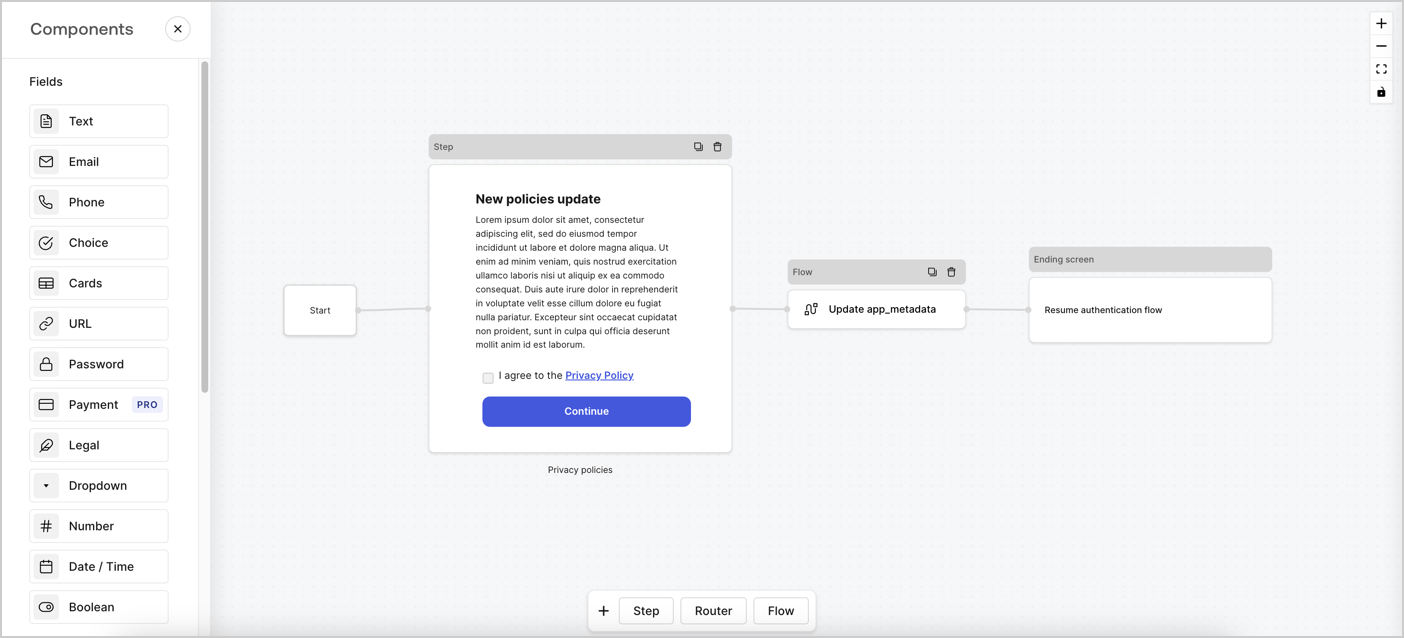
Forms for Actions allows you to create custom privacy policies flows and store the consent under the `app_metadata` object.
<Frame>
  <img src="https://mintcdn.com/docs-dev-feat-docs-5540/VcA_565GWH7dGBkD/docs/images/cdy7uua7fh8z/6i68dMvHDTijfRmSgN1x8Q/ad900e7d4c0fb34645921435472b8684/privavy-policy-form.png?fit=max&auto=format&n=VcA_565GWH7dGBkD&q=85&s=c0f9d9ac0c74809ae415cc0da96f1ab7" alt="Dashboard > Actions > Forms > Privacy policy use case" data-og-width="1404" width="1404" data-og-height="638" height="638" data-path="docs/images/cdy7uua7fh8z/6i68dMvHDTijfRmSgN1x8Q/ad900e7d4c0fb34645921435472b8684/privavy-policy-form.png" data-optimize="true" data-opv="3" srcset="https://mintcdn.com/docs-dev-feat-docs-5540/VcA_565GWH7dGBkD/docs/images/cdy7uua7fh8z/6i68dMvHDTijfRmSgN1x8Q/ad900e7d4c0fb34645921435472b8684/privavy-policy-form.png?w=280&fit=max&auto=format&n=VcA_565GWH7dGBkD&q=85&s=9f712fe40483ac89c506d33c43d67108 280w, https://mintcdn.com/docs-dev-feat-docs-5540/VcA_565GWH7dGBkD/docs/images/cdy7uua7fh8z/6i68dMvHDTijfRmSgN1x8Q/ad900e7d4c0fb34645921435472b8684/privavy-policy-form.png?w=560&fit=max&auto=format&n=VcA_565GWH7dGBkD&q=85&s=de5bc2628d10b03b8ee9b91560d06757 560w, https://mintcdn.com/docs-dev-feat-docs-5540/VcA_565GWH7dGBkD/docs/images/cdy7uua7fh8z/6i68dMvHDTijfRmSgN1x8Q/ad900e7d4c0fb34645921435472b8684/privavy-policy-form.png?w=840&fit=max&auto=format&n=VcA_565GWH7dGBkD&q=85&s=bacb883be72d6ee83698161b124dce6f 840w, https://mintcdn.com/docs-dev-feat-docs-5540/VcA_565GWH7dGBkD/docs/images/cdy7uua7fh8z/6i68dMvHDTijfRmSgN1x8Q/ad900e7d4c0fb34645921435472b8684/privavy-policy-form.png?w=1100&fit=max&auto=format&n=VcA_565GWH7dGBkD&q=85&s=84bc7d4e1e6c1bb9db15b341ac66d4f3 1100w, https://mintcdn.com/docs-dev-feat-docs-5540/VcA_565GWH7dGBkD/docs/images/cdy7uua7fh8z/6i68dMvHDTijfRmSgN1x8Q/ad900e7d4c0fb34645921435472b8684/privavy-policy-form.png?w=1650&fit=max&auto=format&n=VcA_565GWH7dGBkD&q=85&s=38d39818765458bcef6150a68dacf4b2 1650w, https://mintcdn.com/docs-dev-feat-docs-5540/VcA_565GWH7dGBkD/docs/images/cdy7uua7fh8z/6i68dMvHDTijfRmSgN1x8Q/ad900e7d4c0fb34645921435472b8684/privavy-policy-form.png?w=2500&fit=max&auto=format&n=VcA_565GWH7dGBkD&q=85&s=5ea3bdc034bf164a7e616e5e8659fa16 2500w" />
</Frame>

The sections below outline how you can create an Update Policy form using nodes and flows, along with steps for adding your form to a [Post Login](/docs/customize/actions/explore-triggers/signup-and-login-triggers/login-trigger) Action.

## Create a form from scratch

Follow these steps to create a form to gather information:

1. Open the Form editor by selecting **Auth0 Dashboard > Actions > Forms.**
2. Select **Create Form** > **Start from scratch**.

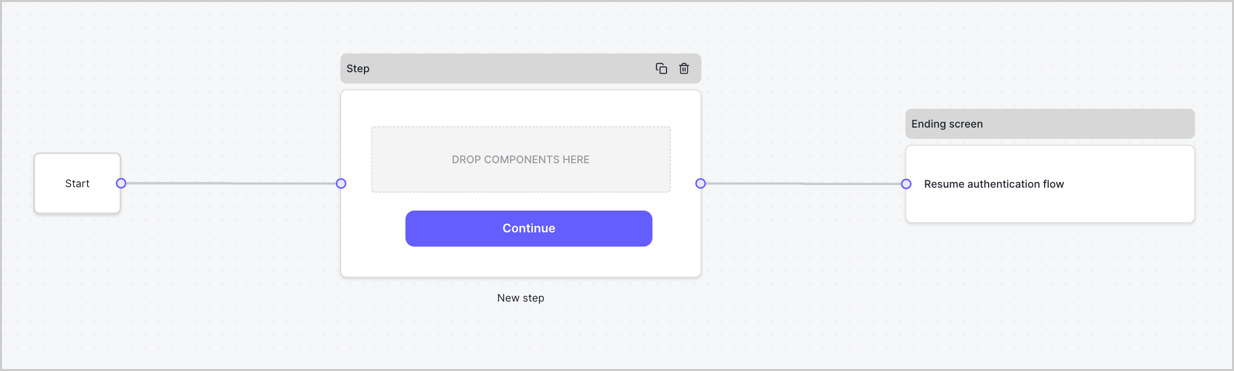
By default, a new form contains a Start node, a Step node, and an Ending screen node.
<Frame>
  <img src="https://mintcdn.com/docs-dev-feat-docs-5540/elZumk664iW4xxu0/docs/images/cdy7uua7fh8z/2TZ9jSjgEcARFpULI6hz4R/a4319a1bd482f2ee5cc23100fdb2f42c/New-form-Forms-for-action-use-case.png?fit=max&auto=format&n=elZumk664iW4xxu0&q=85&s=9dd56652d24f97c035152f02884850d9" alt="Dashboard > Forms > Use Cases > Form" data-og-width="1234" width="1234" data-og-height="371" height="371" data-path="docs/images/cdy7uua7fh8z/2TZ9jSjgEcARFpULI6hz4R/a4319a1bd482f2ee5cc23100fdb2f42c/New-form-Forms-for-action-use-case.png" data-optimize="true" data-opv="3" srcset="https://mintcdn.com/docs-dev-feat-docs-5540/elZumk664iW4xxu0/docs/images/cdy7uua7fh8z/2TZ9jSjgEcARFpULI6hz4R/a4319a1bd482f2ee5cc23100fdb2f42c/New-form-Forms-for-action-use-case.png?w=280&fit=max&auto=format&n=elZumk664iW4xxu0&q=85&s=e8be295b2539bcfc6c598119797bcfd7 280w, https://mintcdn.com/docs-dev-feat-docs-5540/elZumk664iW4xxu0/docs/images/cdy7uua7fh8z/2TZ9jSjgEcARFpULI6hz4R/a4319a1bd482f2ee5cc23100fdb2f42c/New-form-Forms-for-action-use-case.png?w=560&fit=max&auto=format&n=elZumk664iW4xxu0&q=85&s=355f24c10d44c19c050e89b04915b444 560w, https://mintcdn.com/docs-dev-feat-docs-5540/elZumk664iW4xxu0/docs/images/cdy7uua7fh8z/2TZ9jSjgEcARFpULI6hz4R/a4319a1bd482f2ee5cc23100fdb2f42c/New-form-Forms-for-action-use-case.png?w=840&fit=max&auto=format&n=elZumk664iW4xxu0&q=85&s=da9af6b27bd22f04b4471aeed41ca3ce 840w, https://mintcdn.com/docs-dev-feat-docs-5540/elZumk664iW4xxu0/docs/images/cdy7uua7fh8z/2TZ9jSjgEcARFpULI6hz4R/a4319a1bd482f2ee5cc23100fdb2f42c/New-form-Forms-for-action-use-case.png?w=1100&fit=max&auto=format&n=elZumk664iW4xxu0&q=85&s=a47e41de732e68469a754065e29c349c 1100w, https://mintcdn.com/docs-dev-feat-docs-5540/elZumk664iW4xxu0/docs/images/cdy7uua7fh8z/2TZ9jSjgEcARFpULI6hz4R/a4319a1bd482f2ee5cc23100fdb2f42c/New-form-Forms-for-action-use-case.png?w=1650&fit=max&auto=format&n=elZumk664iW4xxu0&q=85&s=95e20030c0903e7c3290aea30d1753b7 1650w, https://mintcdn.com/docs-dev-feat-docs-5540/elZumk664iW4xxu0/docs/images/cdy7uua7fh8z/2TZ9jSjgEcARFpULI6hz4R/a4319a1bd482f2ee5cc23100fdb2f42c/New-form-Forms-for-action-use-case.png?w=2500&fit=max&auto=format&n=elZumk664iW4xxu0&q=85&s=e9e340c965b11e3cae48cabea3751106 2500w" />
</Frame>

### Configure the Step node

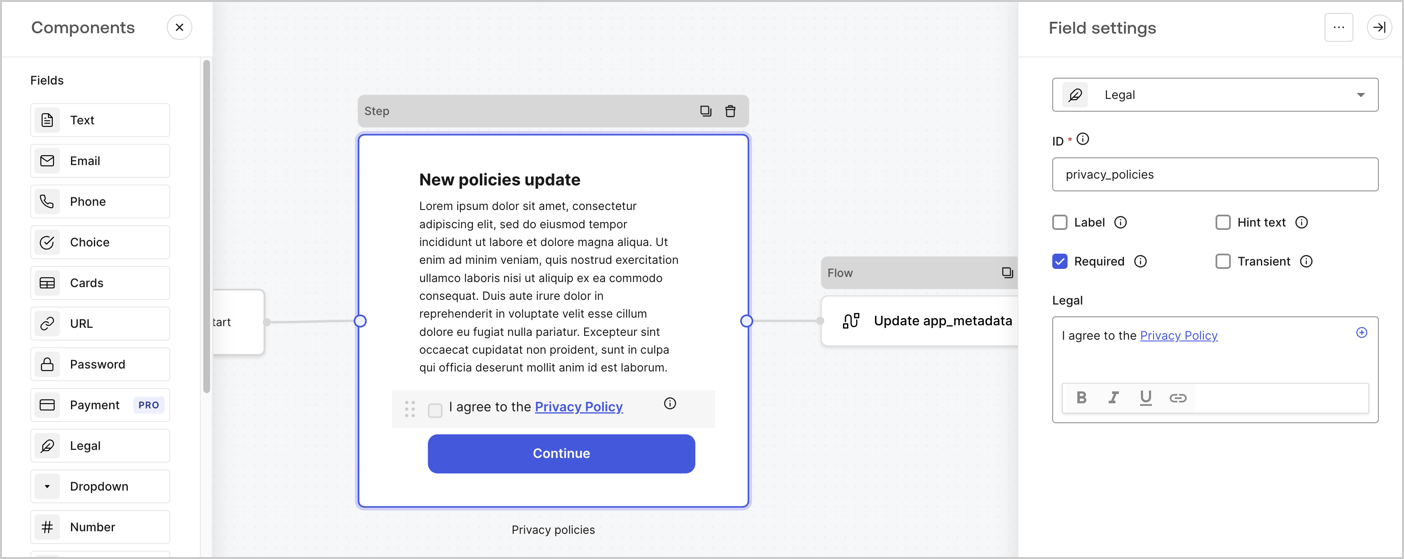
The Step node is the graphical interface visible to users. Add [Fields](/docs/customize/forms/nodes-and-components) to the Step node to collect the new agreement acceptance value by following these steps:

1. Drag a **Rich text** field from the **Components menu** into the **Step** node.

   * **Rich text**: Enter a description of your privacy policies updates.
   * Select **Save**.
2. Drag a **Legal** field into the **Step** node.

   * **ID**: Enter `privacy_policies`.
   * **Required**: Enable the checkbox.
   * **Legal**: Enter `I agree to the Privacy Policy`.
   * Select **Save**.
3. Select **Publish** to save.
<Frame>
  <img src="https://mintcdn.com/docs-dev-feat-docs-5540/RbW94J0Lv-5xi2i1/docs/images/cdy7uua7fh8z/59zFFjQjAnjogkc2QGIqqJ/0ad66b1b636544122aa4e65968b76c2c/privacy-policy-step-node.png?fit=max&auto=format&n=RbW94J0Lv-5xi2i1&q=85&s=50afef67ee549a1b496344ad178e851f" alt="Dashboard > Actions > Forms > Use case privacy policy step node" data-og-width="1404" width="1404" data-og-height="559" height="559" data-path="docs/images/cdy7uua7fh8z/59zFFjQjAnjogkc2QGIqqJ/0ad66b1b636544122aa4e65968b76c2c/privacy-policy-step-node.png" data-optimize="true" data-opv="3" srcset="https://mintcdn.com/docs-dev-feat-docs-5540/RbW94J0Lv-5xi2i1/docs/images/cdy7uua7fh8z/59zFFjQjAnjogkc2QGIqqJ/0ad66b1b636544122aa4e65968b76c2c/privacy-policy-step-node.png?w=280&fit=max&auto=format&n=RbW94J0Lv-5xi2i1&q=85&s=b04ed119a05066b028fb35c1670ceae4 280w, https://mintcdn.com/docs-dev-feat-docs-5540/RbW94J0Lv-5xi2i1/docs/images/cdy7uua7fh8z/59zFFjQjAnjogkc2QGIqqJ/0ad66b1b636544122aa4e65968b76c2c/privacy-policy-step-node.png?w=560&fit=max&auto=format&n=RbW94J0Lv-5xi2i1&q=85&s=aa2c96b2f5b3bc727290f3081ef80a53 560w, https://mintcdn.com/docs-dev-feat-docs-5540/RbW94J0Lv-5xi2i1/docs/images/cdy7uua7fh8z/59zFFjQjAnjogkc2QGIqqJ/0ad66b1b636544122aa4e65968b76c2c/privacy-policy-step-node.png?w=840&fit=max&auto=format&n=RbW94J0Lv-5xi2i1&q=85&s=0c0221b56f2c15caf0fbeaae384fed76 840w, https://mintcdn.com/docs-dev-feat-docs-5540/RbW94J0Lv-5xi2i1/docs/images/cdy7uua7fh8z/59zFFjQjAnjogkc2QGIqqJ/0ad66b1b636544122aa4e65968b76c2c/privacy-policy-step-node.png?w=1100&fit=max&auto=format&n=RbW94J0Lv-5xi2i1&q=85&s=611b4b722e7ec6b3563af33e61796913 1100w, https://mintcdn.com/docs-dev-feat-docs-5540/RbW94J0Lv-5xi2i1/docs/images/cdy7uua7fh8z/59zFFjQjAnjogkc2QGIqqJ/0ad66b1b636544122aa4e65968b76c2c/privacy-policy-step-node.png?w=1650&fit=max&auto=format&n=RbW94J0Lv-5xi2i1&q=85&s=0007b49040efc87357382a22890fd197 1650w, https://mintcdn.com/docs-dev-feat-docs-5540/RbW94J0Lv-5xi2i1/docs/images/cdy7uua7fh8z/59zFFjQjAnjogkc2QGIqqJ/0ad66b1b636544122aa4e65968b76c2c/privacy-policy-step-node.png?w=2500&fit=max&auto=format&n=RbW94J0Lv-5xi2i1&q=85&s=856ddc9e000c811f53e6602b3e554d51 2500w" />
</Frame>

### Configure the Flow node

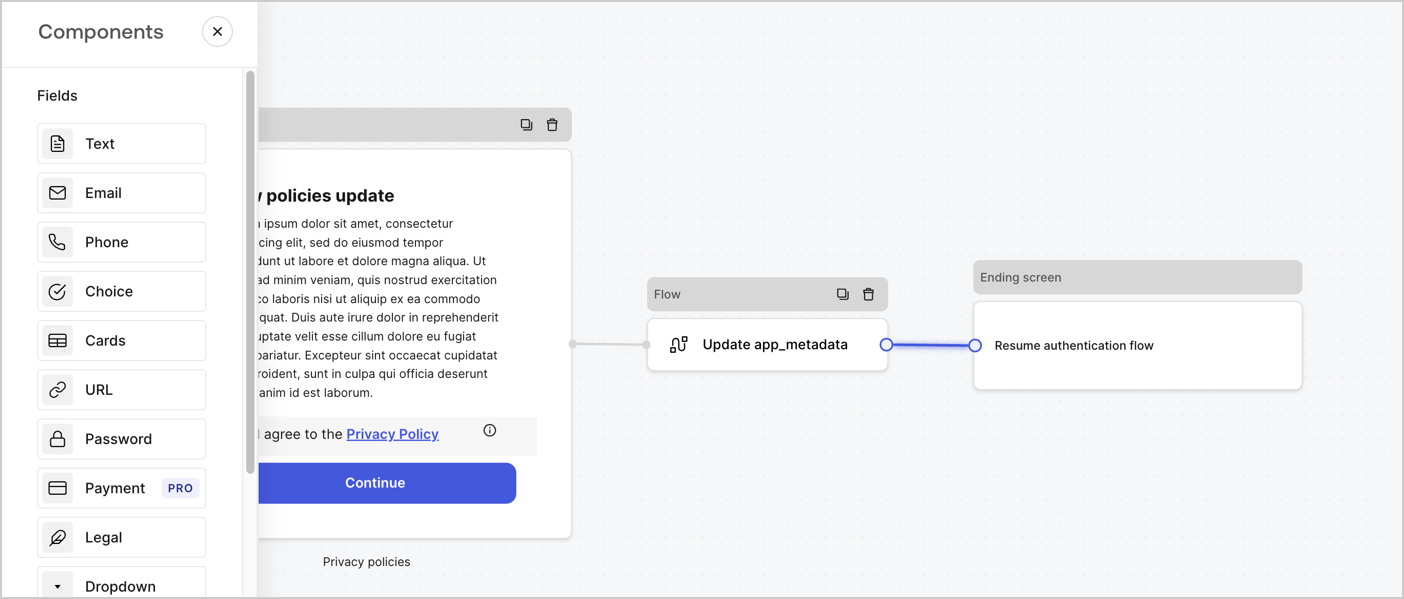
Add a **Flow** node after the **Step** node to update the `app_metadata` and resume the authentication flow by following these steps:

1. Select **Flow** from the bottom of the Form editor.
2. Remove the existing link between the **Step** and **Ending Screen** nodes.
3. Select the new **Flow** > **Click to add a flow** > **Create a new flow.**

   * Enter `Update app_metadata` in the **Name** field.
   * Select **Create**.
   * Select **Save**.
4. Link the **Flow** node to the **Step** and **Ending Screen** nodes as pictured below.
5. Select **Publish** to save.
<Frame>
  <img src="https://mintcdn.com/docs-dev-feat-docs-5540/VcA_565GWH7dGBkD/docs/images/cdy7uua7fh8z/6YIkzm7SrpM9LW76AXuRzh/353c518fe82bbaa440836da1d83596d6/link-policies.png?fit=max&auto=format&n=VcA_565GWH7dGBkD&q=85&s=5ab6b527d1368e4d60e91ffec4db6fce" alt="Dashboard > Actions > Forms > Form" data-og-width="1404" width="1404" data-og-height="599" height="599" data-path="docs/images/cdy7uua7fh8z/6YIkzm7SrpM9LW76AXuRzh/353c518fe82bbaa440836da1d83596d6/link-policies.png" data-optimize="true" data-opv="3" srcset="https://mintcdn.com/docs-dev-feat-docs-5540/VcA_565GWH7dGBkD/docs/images/cdy7uua7fh8z/6YIkzm7SrpM9LW76AXuRzh/353c518fe82bbaa440836da1d83596d6/link-policies.png?w=280&fit=max&auto=format&n=VcA_565GWH7dGBkD&q=85&s=5274605c31e9062b8fbaeb92ea081487 280w, https://mintcdn.com/docs-dev-feat-docs-5540/VcA_565GWH7dGBkD/docs/images/cdy7uua7fh8z/6YIkzm7SrpM9LW76AXuRzh/353c518fe82bbaa440836da1d83596d6/link-policies.png?w=560&fit=max&auto=format&n=VcA_565GWH7dGBkD&q=85&s=ddb86d069aecac13c0e5355d590deaf5 560w, https://mintcdn.com/docs-dev-feat-docs-5540/VcA_565GWH7dGBkD/docs/images/cdy7uua7fh8z/6YIkzm7SrpM9LW76AXuRzh/353c518fe82bbaa440836da1d83596d6/link-policies.png?w=840&fit=max&auto=format&n=VcA_565GWH7dGBkD&q=85&s=674fb4673ddd173b947f2418984e2a02 840w, https://mintcdn.com/docs-dev-feat-docs-5540/VcA_565GWH7dGBkD/docs/images/cdy7uua7fh8z/6YIkzm7SrpM9LW76AXuRzh/353c518fe82bbaa440836da1d83596d6/link-policies.png?w=1100&fit=max&auto=format&n=VcA_565GWH7dGBkD&q=85&s=c18ce3a7f618a363f11e0d426f219531 1100w, https://mintcdn.com/docs-dev-feat-docs-5540/VcA_565GWH7dGBkD/docs/images/cdy7uua7fh8z/6YIkzm7SrpM9LW76AXuRzh/353c518fe82bbaa440836da1d83596d6/link-policies.png?w=1650&fit=max&auto=format&n=VcA_565GWH7dGBkD&q=85&s=8bae6b9162bafe7b1ab7b2a496a48100 1650w, https://mintcdn.com/docs-dev-feat-docs-5540/VcA_565GWH7dGBkD/docs/images/cdy7uua7fh8z/6YIkzm7SrpM9LW76AXuRzh/353c518fe82bbaa440836da1d83596d6/link-policies.png?w=2500&fit=max&auto=format&n=VcA_565GWH7dGBkD&q=85&s=fe06c522598953555587ae2790d024d3 2500w" />
</Frame>

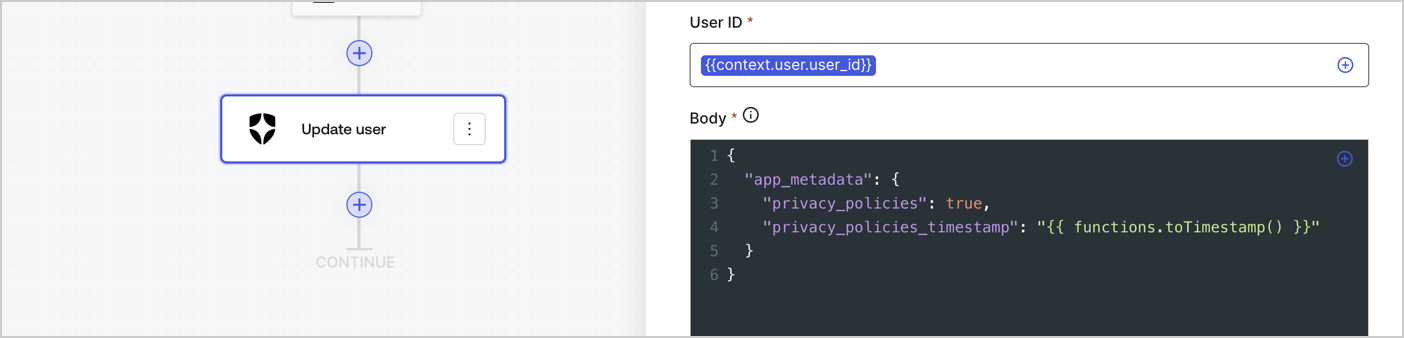
Add an Auth0 Update user action to the flow by following these steps:

1. Select the **Flow** **Update app\_metadata** > **Edit flow** to open the Flow editor in a new tab.
2. Below the StartAction, select the **+** icon to add an **Update user** action. Complete the fields below, then select **Save** to continue.

   * **Connection**: Select from the dropdown the Vault connection to your M2M application.

   * **User ID**: Enter `{{context.user.user_id}}`.

   * **Body**: Copy and paste the following code to update the app\_metadata with the privacy\_policies and privacy\_policies\_timestamp properties.

     ```text lines theme={null}
     {
       "app_metadata": {
         "privacy_policies": true,
         "privacy_policies_timestamp": "{{ functions.toTimestamp() }}"
       }
     }
     ```

   * Select **Save**.
3. Select **Publish** to save.
<Frame>
  <img src="https://mintcdn.com/docs-dev-feat-docs-5540/gRGt0CiYjvC4Sp9R/docs/images/cdy7uua7fh8z/CvMNIwWrOUwaFW4X3G28p/1fb70ae57a20749d9ffaaba8dc0b7e26/update-user-privacy.png?fit=max&auto=format&n=gRGt0CiYjvC4Sp9R&q=85&s=70b7b3515975decbba96f6b2f4ecd17f" alt="Dashboard > Actions > Forms > User case privacy policy code" data-og-width="1404" width="1404" data-og-height="338" height="338" data-path="docs/images/cdy7uua7fh8z/CvMNIwWrOUwaFW4X3G28p/1fb70ae57a20749d9ffaaba8dc0b7e26/update-user-privacy.png" data-optimize="true" data-opv="3" srcset="https://mintcdn.com/docs-dev-feat-docs-5540/gRGt0CiYjvC4Sp9R/docs/images/cdy7uua7fh8z/CvMNIwWrOUwaFW4X3G28p/1fb70ae57a20749d9ffaaba8dc0b7e26/update-user-privacy.png?w=280&fit=max&auto=format&n=gRGt0CiYjvC4Sp9R&q=85&s=f47b818230223a9e3234e955d64a813a 280w, https://mintcdn.com/docs-dev-feat-docs-5540/gRGt0CiYjvC4Sp9R/docs/images/cdy7uua7fh8z/CvMNIwWrOUwaFW4X3G28p/1fb70ae57a20749d9ffaaba8dc0b7e26/update-user-privacy.png?w=560&fit=max&auto=format&n=gRGt0CiYjvC4Sp9R&q=85&s=0460304cbf13ac46f99af32f3ffbd9a3 560w, https://mintcdn.com/docs-dev-feat-docs-5540/gRGt0CiYjvC4Sp9R/docs/images/cdy7uua7fh8z/CvMNIwWrOUwaFW4X3G28p/1fb70ae57a20749d9ffaaba8dc0b7e26/update-user-privacy.png?w=840&fit=max&auto=format&n=gRGt0CiYjvC4Sp9R&q=85&s=6c993eee78c9922e8c3b8ee2dd055ff3 840w, https://mintcdn.com/docs-dev-feat-docs-5540/gRGt0CiYjvC4Sp9R/docs/images/cdy7uua7fh8z/CvMNIwWrOUwaFW4X3G28p/1fb70ae57a20749d9ffaaba8dc0b7e26/update-user-privacy.png?w=1100&fit=max&auto=format&n=gRGt0CiYjvC4Sp9R&q=85&s=411abac892d1ae7ffd8f4039719ddd5f 1100w, https://mintcdn.com/docs-dev-feat-docs-5540/gRGt0CiYjvC4Sp9R/docs/images/cdy7uua7fh8z/CvMNIwWrOUwaFW4X3G28p/1fb70ae57a20749d9ffaaba8dc0b7e26/update-user-privacy.png?w=1650&fit=max&auto=format&n=gRGt0CiYjvC4Sp9R&q=85&s=9d727dbf0380205a444b01164b31b1cb 1650w, https://mintcdn.com/docs-dev-feat-docs-5540/gRGt0CiYjvC4Sp9R/docs/images/cdy7uua7fh8z/CvMNIwWrOUwaFW4X3G28p/1fb70ae57a20749d9ffaaba8dc0b7e26/update-user-privacy.png?w=2500&fit=max&auto=format&n=gRGt0CiYjvC4Sp9R&q=85&s=74cb3f851eda8819f541e47d7d0c0eac 2500w" />
</Frame>

<Callout icon="file-lines" color="#0EA5E9" iconType="regular">
  The flow **Update app\_metadata** adds a `privacy_policies true` value to the app`_metadata` object and also generates a timestamp with a [helper function.](/docs/customize/forms/variables)
</Callout>

## Retrieve the form render code

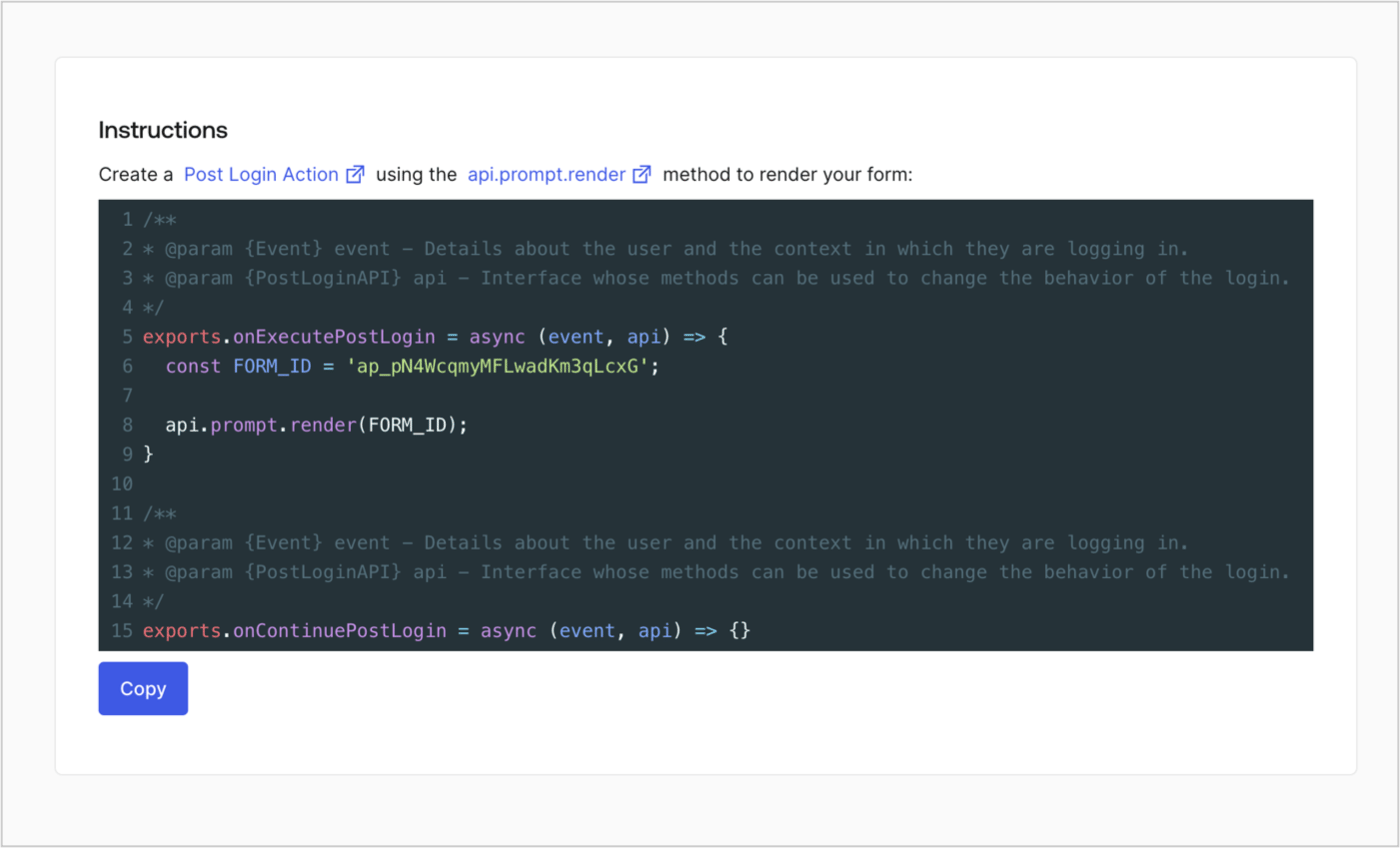
Retrieve your form render code to visually render the form with a custom Post Login Action by following these steps:

* From the Form editor, select **`<> Render`**.
* Select **Copy**.
<Frame>
  <img src="https://mintcdn.com/docs-dev-feat-docs-5540/o4zv_cTW-3w9L5EW/docs/images/cdy7uua7fh8z/2EIUzc539sq9lwoTKbjoJv/496a864c0fc44a782c9cadca119dbfb0/embed.png?fit=max&auto=format&n=o4zv_cTW-3w9L5EW&q=85&s=8a5f29b90b4ab225c393f1f90b8c8fc9" alt="Dashboard > Actions > Forms > Form > Embed" data-og-width="1400" width="1400" data-og-height="848" height="848" data-path="docs/images/cdy7uua7fh8z/2EIUzc539sq9lwoTKbjoJv/496a864c0fc44a782c9cadca119dbfb0/embed.png" data-optimize="true" data-opv="3" srcset="https://mintcdn.com/docs-dev-feat-docs-5540/o4zv_cTW-3w9L5EW/docs/images/cdy7uua7fh8z/2EIUzc539sq9lwoTKbjoJv/496a864c0fc44a782c9cadca119dbfb0/embed.png?w=280&fit=max&auto=format&n=o4zv_cTW-3w9L5EW&q=85&s=dd0e0602b0ab6517b689936200e13b49 280w, https://mintcdn.com/docs-dev-feat-docs-5540/o4zv_cTW-3w9L5EW/docs/images/cdy7uua7fh8z/2EIUzc539sq9lwoTKbjoJv/496a864c0fc44a782c9cadca119dbfb0/embed.png?w=560&fit=max&auto=format&n=o4zv_cTW-3w9L5EW&q=85&s=3d453f6169eaaf74d2ad57f72306bf6c 560w, https://mintcdn.com/docs-dev-feat-docs-5540/o4zv_cTW-3w9L5EW/docs/images/cdy7uua7fh8z/2EIUzc539sq9lwoTKbjoJv/496a864c0fc44a782c9cadca119dbfb0/embed.png?w=840&fit=max&auto=format&n=o4zv_cTW-3w9L5EW&q=85&s=840c02c14e5a20bd56682c7802c3061a 840w, https://mintcdn.com/docs-dev-feat-docs-5540/o4zv_cTW-3w9L5EW/docs/images/cdy7uua7fh8z/2EIUzc539sq9lwoTKbjoJv/496a864c0fc44a782c9cadca119dbfb0/embed.png?w=1100&fit=max&auto=format&n=o4zv_cTW-3w9L5EW&q=85&s=b29f81bc224026e1600f8ea5c6b9d580 1100w, https://mintcdn.com/docs-dev-feat-docs-5540/o4zv_cTW-3w9L5EW/docs/images/cdy7uua7fh8z/2EIUzc539sq9lwoTKbjoJv/496a864c0fc44a782c9cadca119dbfb0/embed.png?w=1650&fit=max&auto=format&n=o4zv_cTW-3w9L5EW&q=85&s=12ef8fcdaebffc537455d7391faacf45 1650w, https://mintcdn.com/docs-dev-feat-docs-5540/o4zv_cTW-3w9L5EW/docs/images/cdy7uua7fh8z/2EIUzc539sq9lwoTKbjoJv/496a864c0fc44a782c9cadca119dbfb0/embed.png?w=2500&fit=max&auto=format&n=o4zv_cTW-3w9L5EW&q=85&s=66396ea7c5cb706658c13f555da268f4 2500w" />
</Frame>

## Create a Post Login Action

Create a post-login Action to render your form by following these steps:

1. Navigate to **Auth0 Dashboard > Actions > Flows > Login.**
2. Select the **+** icon and Select **Build from scratch**:

   * **Name**: Enter `Render Update Policy Form`.
   * **Trigger**: Select `Login / Post Login`.
   * **Runtime**: Select the recommended version.
3. Select **Create**.

To configure the post-login Action:

1. Delete the existing code from the Code editor.
2. Paste the form render code into the Code editor.
3. Edit the code to define the conditional logic that will render the form.

   ```javascript lines theme={null}
   /**
   * @param {Event} event - Details about the user and the context in which they are logging in.
   * @param {PostLoginAPI} api - Interface whose methods can be used to change the behavior of the login.
   */
   exports.onExecutePostLogin = async (event, api) => {
     const FORM_ID = 'REPLACE_WITH_YOUR_FORM_ID';

     if (event.user.app_metadata.privacy_policies !== true) {
       api.prompt.render(FORM_ID);
     }
   }

   exports.onContinuePostLogin = async (event, api) => { }
   ```

   <Callout icon="file-lines" color="#0EA5E9" iconType="regular">
     The example code above will render the form when a user is missing the app metadata `privacy_policies` property.
   </Callout>
4. Select **Deploy.**
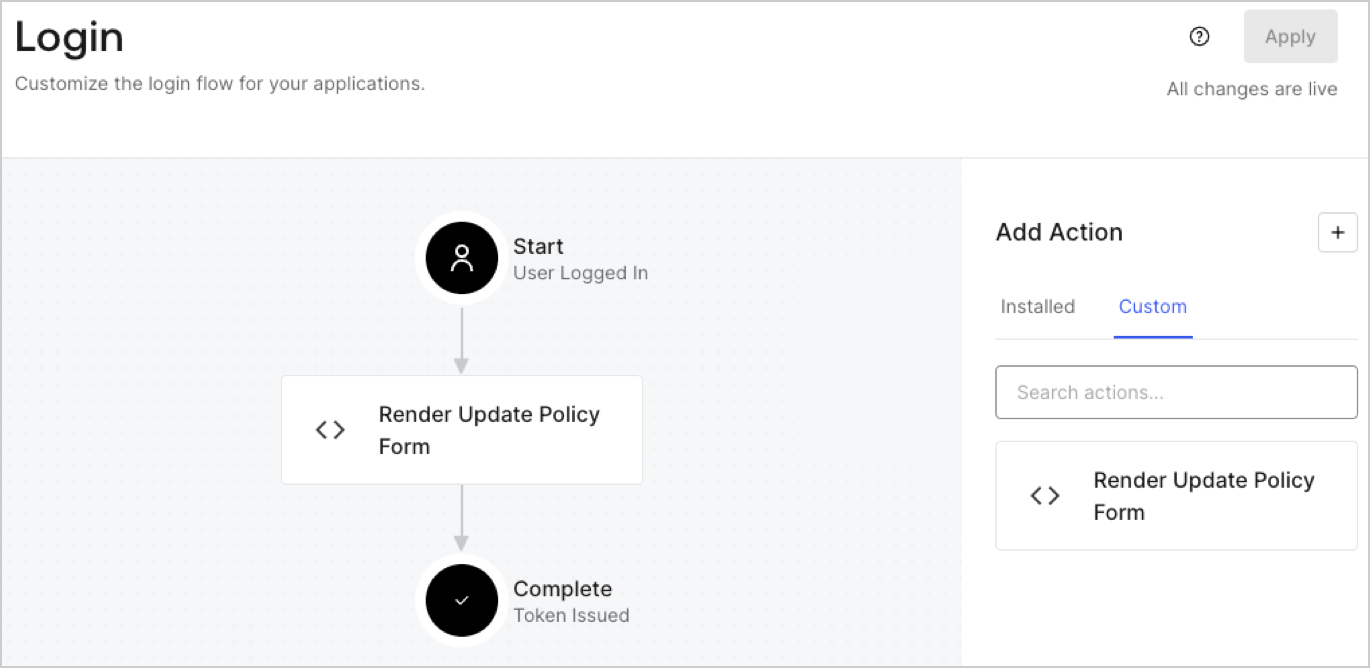
5. Drag and Drop the **Render Update Policy Form** Action to the **Login** flow.
   <Frame>
     <img src="https://mintcdn.com/docs-dev-feat-docs-5540/-8snppQRlzmMKoiy/docs/images/cdy7uua7fh8z/5TOwDgevZsBqd7yZynUYWU/41ca909dc3007aed4f40ff794a05efa5/postlogin.png?fit=max&auto=format&n=-8snppQRlzmMKoiy&q=85&s=c7bb3811925452ce71f0f193ca290958" alt="Dashboard > Forms > Use Case > Render update policy form login action" data-og-width="1370" width="1370" data-og-height="668" height="668" data-path="docs/images/cdy7uua7fh8z/5TOwDgevZsBqd7yZynUYWU/41ca909dc3007aed4f40ff794a05efa5/postlogin.png" data-optimize="true" data-opv="3" srcset="https://mintcdn.com/docs-dev-feat-docs-5540/-8snppQRlzmMKoiy/docs/images/cdy7uua7fh8z/5TOwDgevZsBqd7yZynUYWU/41ca909dc3007aed4f40ff794a05efa5/postlogin.png?w=280&fit=max&auto=format&n=-8snppQRlzmMKoiy&q=85&s=4d0592be00a1f33e1d3e75802c3f8d93 280w, https://mintcdn.com/docs-dev-feat-docs-5540/-8snppQRlzmMKoiy/docs/images/cdy7uua7fh8z/5TOwDgevZsBqd7yZynUYWU/41ca909dc3007aed4f40ff794a05efa5/postlogin.png?w=560&fit=max&auto=format&n=-8snppQRlzmMKoiy&q=85&s=02466121ad235105d8c0c44260f3be98 560w, https://mintcdn.com/docs-dev-feat-docs-5540/-8snppQRlzmMKoiy/docs/images/cdy7uua7fh8z/5TOwDgevZsBqd7yZynUYWU/41ca909dc3007aed4f40ff794a05efa5/postlogin.png?w=840&fit=max&auto=format&n=-8snppQRlzmMKoiy&q=85&s=08f590dc9abb78417dfe774e2e403a76 840w, https://mintcdn.com/docs-dev-feat-docs-5540/-8snppQRlzmMKoiy/docs/images/cdy7uua7fh8z/5TOwDgevZsBqd7yZynUYWU/41ca909dc3007aed4f40ff794a05efa5/postlogin.png?w=1100&fit=max&auto=format&n=-8snppQRlzmMKoiy&q=85&s=c0b81ac0d61e143ac43341fd09a17018 1100w, https://mintcdn.com/docs-dev-feat-docs-5540/-8snppQRlzmMKoiy/docs/images/cdy7uua7fh8z/5TOwDgevZsBqd7yZynUYWU/41ca909dc3007aed4f40ff794a05efa5/postlogin.png?w=1650&fit=max&auto=format&n=-8snppQRlzmMKoiy&q=85&s=9d42c45945f8d255decf709d4951afba 1650w, https://mintcdn.com/docs-dev-feat-docs-5540/-8snppQRlzmMKoiy/docs/images/cdy7uua7fh8z/5TOwDgevZsBqd7yZynUYWU/41ca909dc3007aed4f40ff794a05efa5/postlogin.png?w=2500&fit=max&auto=format&n=-8snppQRlzmMKoiy&q=85&s=0d464a4d80294f4f300b95c6f698b58c 2500w" />
   </Frame>
6. Select **Apply.**

### Test implementation

Test the implementation by following these steps:

1. Log in with an existing user whose app`_metadata` attribute `privacy_policies` does not have a value.
2. The post-login Action in the Login flow will render the form and prompt for acceptance.
3. Select **Auth0 Dashboard > User Management > Users,** locate the user and verify that the `app_metadata` attribute `privacy_policies` contains a `true` value and a timestamp.
